Kids Organization App: What to Look For and How to Set One Up
A kids organization app works when it holds one shared calendar, a short task list and a simple reward. Here is what to look for and an evening setup plan.
By Famiyo Editorial TeamUpdated 6 min read
Thursday morning, a permission slip is due, the cleats are somewhere, and nobody remembers that swim practice moved to 5:30. Most school-age kids are not disorganized by nature. They are carrying a schedule that lives in three adults' heads and a crumpled flyer. This guide covers what a kids organization app should do, which features matter, and how to set one up in a single evening so it keeps working past week two.
What does a kids organization app actually do?
At its simplest, it takes the things a child is supposed to remember and puts them where the child will see them. The useful ones cover three jobs, and it helps to know which job you are shopping for.
| The problem at home | What the app handles | What still needs a person |
|---|---|---|
| "I didn't know I had practice" | Shared calendar with every event, color-coded by child | A parent entering or confirming the events |
| "I forgot to pack my bag" | A repeating task with a reminder | Someone checking the bag the first few weeks |
| "I don't know what to do first" | A short list for today, in order | A conversation about how long each thing takes |
| "Nobody notices what I do" | Points or a progress view | Real praise from you, said out loud |
The right-hand column matters. An app removes the logistics, not the parenting. If you hope it will nag your child so you can stop, it will disappoint you by Friday.
Which features matter for school-age kids?
Plenty of apps offer fifty features. A child needs about five of them.
A calendar everyone shares, so the 3:15 pickup change you type in the car shows up on every phone. A color for each family member, because a 7-year-old can find "blue" long before they can scan a list of names. Repeating tasks, since the same five things happen every school day and nobody wants to retype them. A way for the child to tick things off themselves, which is where the small feeling of ownership comes from. And a visible result, such as points or a weekly summary, because kids work harder at what they can see.
Skip anything that needs your child to have an email account, since many kids under 13 do not, and be wary of apps that fill the screen with badges and animations. Noise is the enemy of organization.
Think about the parent side too. You want a push notification when a task is done, an easy way to approve it if you prefer to check first, and room for two adults to edit. If only one parent can change the calendar, it goes stale within a month.
Set it up in one evening
This is the order that works for most families. Allow about an hour, ideally after the kids are in bed so you can think.
- List the fixed commitments for the next four weeks: school days, early dismissals, practices, lessons, appointments. Check the school calendar and any team schedules, then enter them with the right category and person.
- Give each family member a color and tell the kids what theirs is. Do it as a small ceremony. Children care about this.
- Pick the 3 or 4 daily tasks that cause the most friction. For school-age kids the usual winners are packing the school bag, putting dirty clothes in the hamper, homework done, and one household job.
- Make them repeating, and attach a time of day. "Pack bag" belongs the evening before, not at 7:40 when the bus is due.
- Choose how tasks get finished. Older kids can tick their own. For the first two weeks, many parents prefer to approve each task until the habit forms.
- Add one small reward the child actually wants, such as 15 extra minutes of screen time or choosing dessert. Nothing big yet.
- Sit down with your child and walk through the screen together for five minutes. Let them find today's tasks and tick one off.
Then leave it alone. The first two or three weeks are for the routine to settle, and a habit needs that long before you can judge it. If you keep tweaking the setup every day, the child never learns where anything is.
A sample school week in the app
Here is what one 9-year-old's week might look like once the setup is done. It is an example, not a rule, so change the details to match your house.
| Day | Fixed events | Daily tasks (repeat) | Weekly extra |
|---|---|---|---|
| Mon | Soccer 4:30 | Pack bag, homework, feed the dog | None |
| Tue | Piano 4:00 | Pack bag, homework, feed the dog | None |
| Wed | Early dismissal 1:30 | Pack bag, homework, feed the dog | Take out the trash |
| Thu | Soccer 4:30 | Pack bag, homework, feed the dog | None |
| Fri | Library book due | Pack bag, homework, feed the dog | None |
| Sat | Game 10:00 | Feed the dog | Vacuum one room |
Three daily tasks plus one weekly job fits the usual guidance for this age: about 20 to 30 minutes a day in total. If you are working out how many commitments are too many, our article on how many activities a child should do helps you decide before the calendar fills up.
What can your child manage alone, by age?
Ages 6 and 7 can tick off tasks and read a short list, but a parent still enters everything. Ages 8 and 9 can check the calendar for tomorrow and tell you what they see, which is a good habit to build. Ages 10 to 12 can add their own events if you allow it, and should be the ones who notice that Tuesday has two things on it. Teenagers can run most of it themselves, with a parent glancing at the week on Sunday night.
The aim is to hand over the screen, not the whole job. Watch for the moment your child says "I already did that" before you ask. That is your sign to step back.
When an app won't fix it
Three situations call for something else first. If the child is overloaded with commitments, no app will make Tuesday calmer. Cut something. If the real issue is that the child will not start tasks, the problem is motivation or attention, not information, and a calendar will not touch it. And if the household has no agreed time for "check the app", the screen becomes decoration.
For bigger picture ideas on how to run the household schedule, read family calendar organization ideas. If you want a single screen for everything the family needs, our guide to a digital family command center shows how to lay one out.
Setting this up in Famiyo
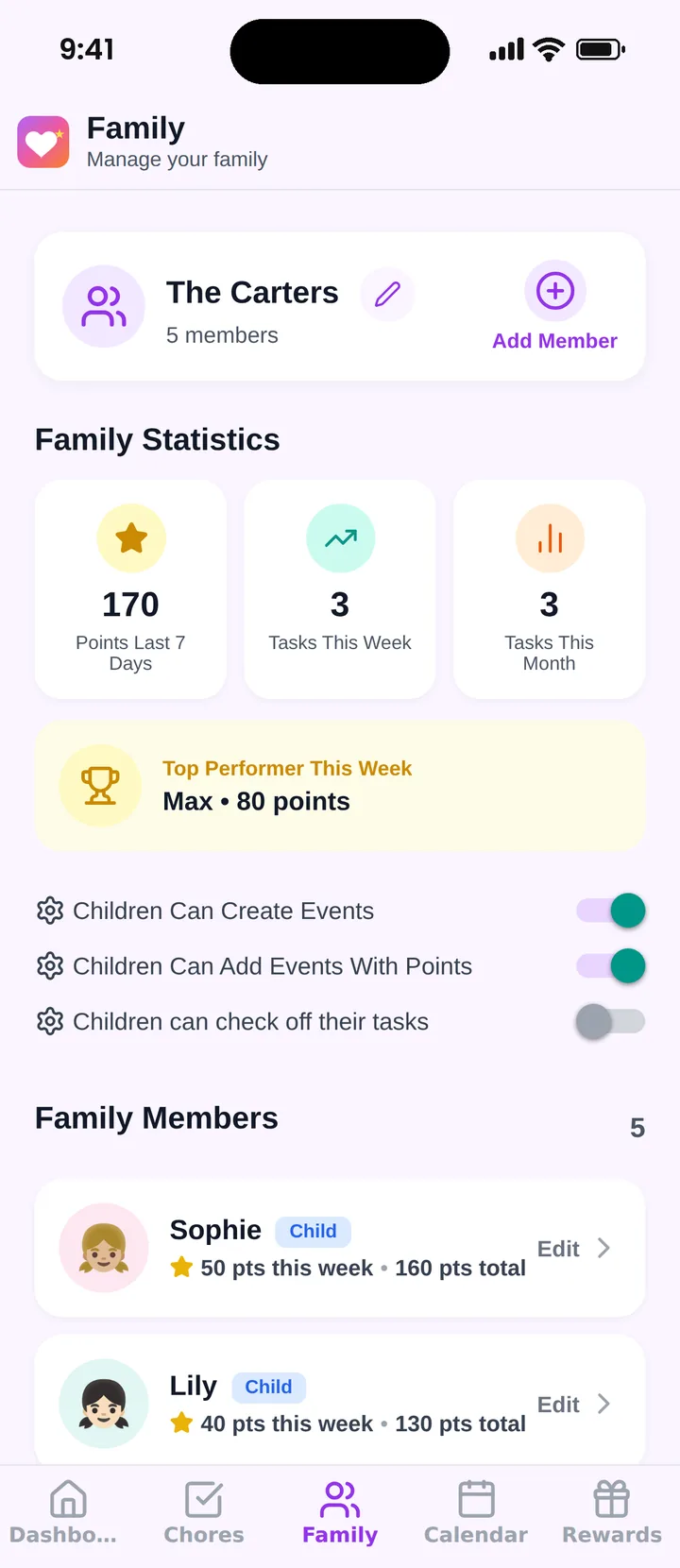
Famiyo is a free family app for iPhone and Android that combines a shared family calendar, chores with points and a rewards shop; kids join with a code, no email needed. For organization it works like this: you put school, sports and appointments on a shared calendar with a color for each person, then add chores that repeat daily, weekly or every few days. Each child gets their own task list and sees their own points. The family overview shows points this week and the top performer, so progress is easy to see at a glance.
The free plan covers up to 3 family members and 1 repeating task, so a larger family or a longer routine may need Premium. Our list of the best family organizer apps compares the options.
Tonight, pick the 3 tasks that cause the most scrambling in your house and set only those up.
Frequently asked questions
At what age can a child use an organization app?
Most children can tick off tasks on their own phone or tablet from about age 6 or 7, when they can read a short list. Younger kids do better with a parent beside them. Before age 10, a parent usually still enters the events.
Will an organization app make my child dependent on a screen?
It can if the app becomes another thing to scroll. Keep it a tool: open it, check today, close it. Many families agree that tasks get checked before games or videos, so the app sits at the start of screen time, not inside it.
What should go into the app first?
Start with fixed things that cause the most scrambling: school days, practices, lessons and appointments. Then add 3 or 4 daily tasks such as packing the bag or feeding the pet. Add more only after the first set feels automatic.
How is this different from a paper planner?
A paper planner lives in one place and needs someone to look at it. An app is on every family phone, updates for everyone at once and can send reminders. Paper still wins for some kids, so the best choice is the one your child will actually open.
Try Famiyo With Your Family
Chores with points, a rewards shop for kids and one shared family calendar. Set it up in a couple of minutes.



Free to download • No credit card required • Available on iOS & Android