Allowance Tracker for Kids: Spreadsheet, Printable or App?
Compare four ways to track a child's allowance: spreadsheet, printable, notebook or app. See what each costs in effort and which one fits your kid's age.
By Famiyo Editorial Team5 min read
Allowance usually starts well. Then week three arrives, nobody remembers whether the $5 was paid, and the kid insists you owe them for last Saturday. A tracker settles that argument in about ten seconds, and it quietly teaches the habit of watching your own balance.
Below are the four formats parents actually use, what each one is good and bad at, and a simple way to choose.
What a good allowance tracker has to record
Whatever format you pick, the information is the same. Five things are enough:
- The date
- What happened (weekly allowance, bonus job, birthday money, bought a toy)
- Money in
- Money out
- Running balance
If you want the kids to practice saving, add a column or a second jar for each goal. Our savings goal chart for kids shows a layout that works next to any of the formats below.
One rule matters more than the format: the child writes down or at least sees every change. A ledger that only the parent can read is bookkeeping. A ledger the child can read is a lesson.
Spreadsheet: Excel or Google Sheets
A spreadsheet is the first thing most tech-minded parents build. It is flexible, free and exactly as clever as you make it.
A basic setup is one sheet per child with the five columns above and a balance formula in the last column (previous balance plus money in minus money out). Add a second tab for savings goals and you have a decent system.
Good at: custom rules, charts of savings over time, kids aged 9 and up who like seeing a formula work. Google Sheets lets both parents edit from their phones.
Bad at: daily use. Phone spreadsheets are fiddly, so entries get skipped until Sunday night. Younger kids cannot use it alone, and one wrong formula can quietly give your child a negative balance and a bad mood.
Printable ledger or chart
A printed page on the fridge or inside a folder is the lowest-friction option. A ruled table with the five columns, a pencil and a payday ritual is all it takes.
Good at: ages 5 to 8, kids who need to see and touch the number, families who want less screen time around money. A child can fill in the line themselves, which is real arithmetic practice.
Bad at: math errors accumulate, pages get lost, and a printed chart cannot tell you anything about last month without flipping through paper. It also does nothing about the "did I do my chores?" side of the story. If allowance is tied to jobs, a chore allowance chart combines the checkmarks and the money on one sheet.
Notebook or jar system
Some families skip the table entirely: a small notebook, or three labeled jars for spend, save and give. Coins and bills are physically sorted when allowance is paid.
Good at: ages 4 to 7 and anyone who learns by handling money. The jar level is the balance. There is nothing to maintain.
Bad at: it only works with cash. Birthday checks, gift cards and bank deposits do not fit in a jar, and there is no history. Kids older than about 10 usually outgrow it.
Allowance app
Apps put the ledger on a phone the child already carries. Most let you set a recurring amount, record jobs and show a balance. The better ones let several children see only their own account and keep a history without anyone typing it in.
Good at: families with more than one child, kids 10 and older who check their phones constantly anyway, and parents who want automatic reminders. The record builds itself, so there is nothing to forget on payday.
Bad at: setup takes a little while, free plans have limits, and a phone screen is less tangible than coins for small children. Check whether an app actually moves money or only keeps score. Many only keep score, which is fine, but you should know which you are getting. We compare options in our list of the best allowance apps for kids.
Which tracker fits which age
| Age | Best format | Why |
|---|---|---|
| 4-6 | Jars or a simple printed chart | Needs to see and touch coins; very little math |
| 7-8 | Printed ledger the child fills in | Practices adding and subtracting with a pencil |
| 9-12 | Shared spreadsheet or an app | Can handle numbers and check a balance alone |
| 13+ | App or the teen's own sheet | Mixes money from jobs, gifts and spending; wants privacy and control |
Two kids at very different ages can use different formats. That is normal. What matters is that each child's balance is visible to them.
A one-minute payday routine
Any tracker fails without a ritual. Try this each week, at the same time, for about a minute:
- Pay the allowance or confirm the points earned.
- The child writes or checks the new entry. Younger kids say it aloud.
- Add any spending since last time ("Bought a sticker book, minus $3").
- Read the new balance out loud together.
- Ask one question: "Is anything you want in your savings goal now?"
Keep it quick and keep it neutral. If payday turns into a speech, kids start avoiding it. For help deciding whether to link payment to jobs at all, read allowance vs chore money.
Tracking allowance in Famiyo
Famiyo is a free family app for iPhone and Android that combines a shared family calendar, chores with points and a rewards shop; kids join with a code, no email needed. Instead of a money ledger, it keeps score in points. Chores earn points, and you decide the price of each reward in the rewards shop. Pocket money can be one of those rewards, for example "$5 pocket money, 500 points". Your child sees their points and what they will have left after redeeming, and you get a notification when they do.
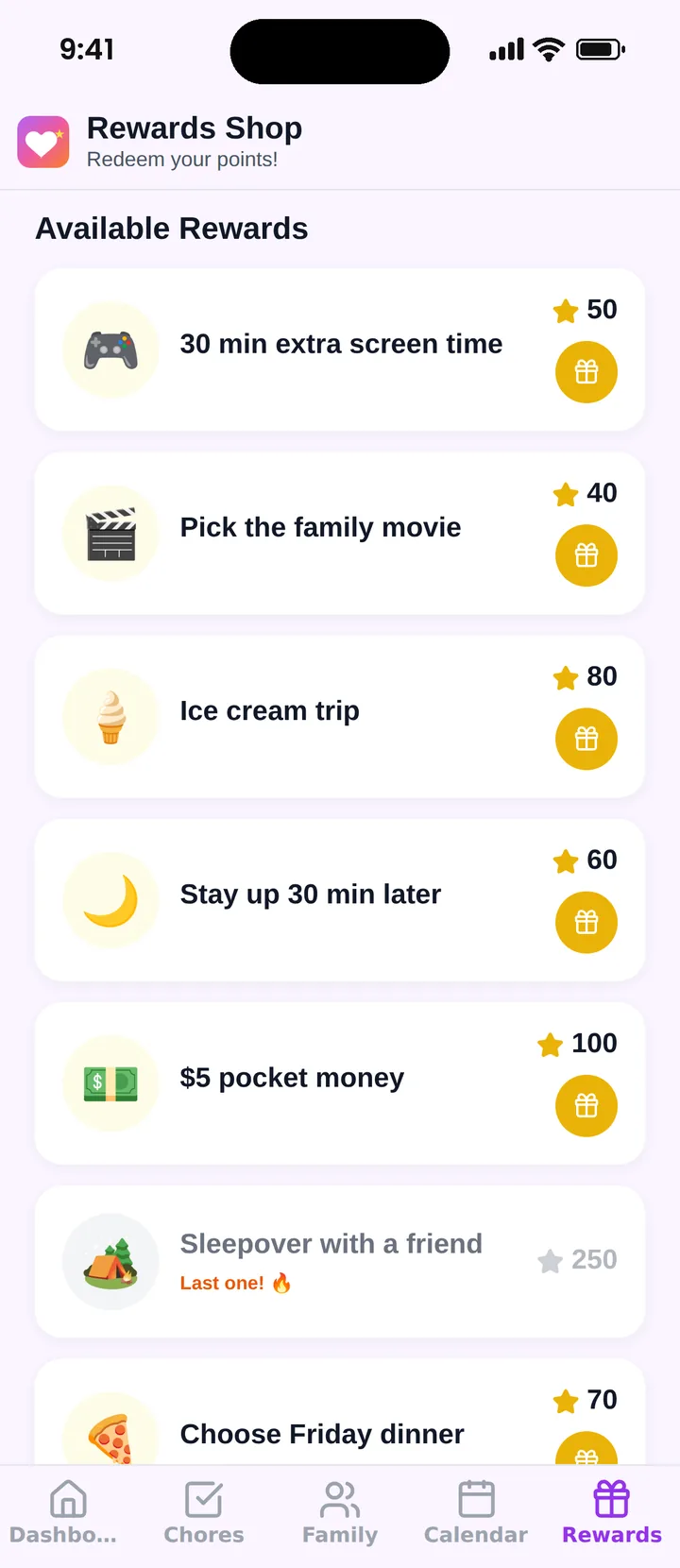
Famiyo does not hold or move real money. The cash or transfer happens outside the app, which keeps the tracker simple. If you convert points to money, the usual rule is 100 points to $1.
Picking one and sticking with it
Choose the format you would be willing to update on a tired Sunday. Run it for three weeks before changing anything. Switching trackers every month is the most common reason kids stop caring about the balance.
Frequently asked questions
What is the easiest way to track allowance?
A paper ledger with four columns (date, money in, money out, balance) is the easiest to start. It takes one minute per payday, needs no setup and a child can fill it in themselves from about age 7.
Should kids see their own allowance balance?
Yes. A balance the child can read at any time is the whole point of tracking. Seeing the number grow toward a goal, or shrink after a purchase, teaches more than any lecture about money.
Does a spreadsheet or an app work better for several kids?
A spreadsheet works if one parent enjoys maintaining it, one tab per child. An app handles several kids better because each child has their own login and nobody has to retype totals or send screenshots.
Can an app hold my child's real allowance money?
Famiyo does not hold or move real money. It tracks points kids earn and spend, and you can list pocket money as a reward. The cash or bank transfer still happens outside the app.
Try Famiyo With Your Family
Chores with points, a rewards shop for kids and one shared family calendar. Set it up in a couple of minutes.



Free to download • No credit card required • Available on iOS & Android