How to Make a Chore Chart on Canva (Step by Step)
Make a printable chore chart in Canva in about 20 minutes: pick a template or build a grid, add icons, print or save it, and know when to switch to an app.
By Famiyo Editorial Team4 min read
Canva is a quick way to get a chore chart that looks like you meant it. You can build one from a template or from scratch, tuned to your kids' ages and your own fridge door. Here is the whole process, from picking chores to printing, plus the honest limits of a chart that lives on paper.
Menus in Canva change from time to time, so if a button has moved, the names below should still help you find it.
Before you open Canva: decide the content
The design takes ten minutes. The thinking takes longer, so do it first.
- Who is the chart for? One child, or the whole family?
- Which days? Most families use Monday to Sunday.
- Which chores? Two or three daily tasks for preschoolers, three or four for school-age kids. See our chore list for kids if you need ideas.
- Do you want points or stars? A simple rule: 5 for small tasks, 10 for medium ones, 20 for big jobs.
- What counts as done? Write it in a few words ("bed made, blanket up").
With the list written down, you can build the chart without second-guessing the layout.
Step by step: build the chart in Canva
- Create a design. On the Canva home page, type "chore chart" into the search bar and look at the templates. If you prefer a blank page, choose Create a design, then Custom size, and enter 11 by 8.5 inches for a landscape letter page.
- Pick a template or start blank. Templates are quick. Choose one with big, plain boxes, because small decorative fonts get hard to read on a fridge. Click a template and it opens in the editor.
- Set up the grid. In the left panel, open Elements and search "table." Insert one with the number of rows you need (one per chore, plus a header) and eight columns (task name plus seven days). Drag the corners to fill the page.
- Add the chores. Click a cell and type. Use the same short verb at the start of each: "Make bed," "Feed the dog," "Pack school bag."
- Add pictures. For kids who don't read yet, search Elements for icons like a bed, a toothbrush or a dog bowl and place one in each task cell. This matters a lot for kids under 7, and a routine with 4 to 6 steps is about the limit for a visual chart.
- Add points, if you use them. Put the number in a small column at the end, or in each task name: "Make bed (5)."
- Choose colors. One color per child, if the chart is shared. Keep text dark on a light background so it stays legible.
- Download. Click Share, then Download, and choose PDF Print for a crisp print or PNG for a quick save. Print at actual size.
Make it hold up on the fridge
A paper chart takes a beating. A few small steps help:
- Print on cardstock, or laminate the page and use a dry-erase marker so it can be wiped each week.
- Put the chart at kid height, near where the chores happen, not in the hall where nobody looks.
- Print a stack of blank pages if you'd rather use stickers or pencil each week.
- Keep a reward menu next to it so kids know what the points are for.
If you want more layout ideas, see chore chart ideas for kids. The guide to how to make a chore chart in 6 steps covers the planning side without any particular tool.
Small design choices that matter
Kids read charts from a few feet away, so the details decide whether it gets used. Use a font size big enough to read from the doorway, and leave blank space around each check box so small hands can mark it. Keep to two or three colors, and give each child their own if the chart is shared. If you add a title, make it friendly and short, such as "Mia's jobs."
Where a Canva chart runs out
A designed chart looks good and takes a short time. It also has limits, and it helps to know them before week three.
| What you need | Canva chart | Does it do it? |
|---|---|---|
| Look nice on the fridge | Yes | Yes |
| Print for free | Yes | Yes |
| Repeat chores every week | You reprint or erase | Manual |
| Remind a child | No | No |
| Add up points | You add them by hand | Manual |
| Tell you when a chore is done | You check the fridge | Manual |
| Update for two homes or a babysitter | Reprint and resend | Manual |
None of that is a flaw. It's what paper is. For one child and a short list, a printed chart is enough. When you have several kids, changing chores, or a parent who forgets to check, the manual parts add up.
Doing this with Famiyo
Famiyo is a free family app for iPhone and Android that combines a shared family calendar, chores with points and a rewards shop; kids join with a code, no email needed. It replaces the chart: you add each chore once and set it to repeat daily or weekly, choose who does it and the points, and it shows up on that child's phone with a push notification. Everyone's phone stays in sync, so a change you make is seen at once. Kids check tasks off themselves, or you approve them first.
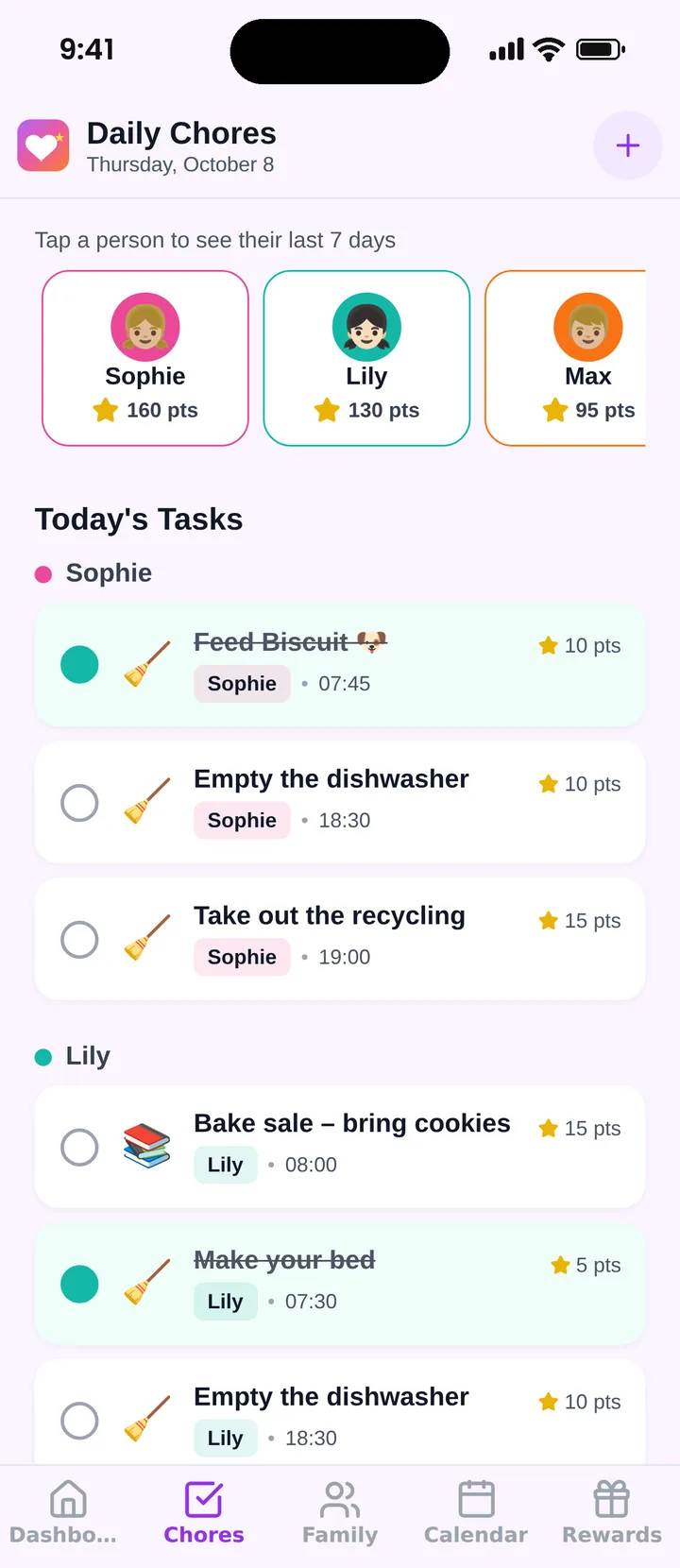
The free plan covers up to 3 family members and 1 repeating task. Compare options in our list of the best chore chart apps.
Start with the Canva version this week if you like the look of it. If the chart dies by Thursday, that's useful information, not a failure.
Frequently asked questions
Is Canva free for making a chore chart?
Canva has a free plan that includes many templates, tables and icons, which is enough for a chore chart. Some elements are marked as Pro and need a paid plan, but you can usually find a free alternative.
What size should a printable chore chart be?
US letter, 8.5 by 11 inches, works for most home printers. Use landscape if you want seven day columns across. A larger poster size suits a fridge or wall, but it needs a print shop or a printer that handles it.
How do I make a chore chart reusable in Canva?
Print it, then laminate it or slip it into a clear sleeve and use dry-erase markers. Or leave the check boxes empty and print a new page each week. Keep the file saved so you can reprint.
How many chores should I put on the chart?
Two or three daily tasks for preschoolers and three or four for school-age kids. More than that and the chart turns into a wall of boxes. Add a weekly job later from about age 8.
Can I share a Canva chore chart with my kids digitally?
You can share a view link or send the file, but a Canva chart is a picture. It does not remind anyone or tick itself off. For repeating chores and reminders, a family app does more than a design file.
Try Famiyo With Your Family
Chores with points, a rewards shop for kids and one shared family calendar. Set it up in a couple of minutes.



Free to download • No credit card required • Available on iOS & Android