Chore Chart Template for Word (Free, Editable Layouts)
Build an editable chore chart in Word in 10 minutes: a 4-step table setup, three layouts that work, and a free printable weekly chart you can print today.
By Famiyo Editorial Team4 min read
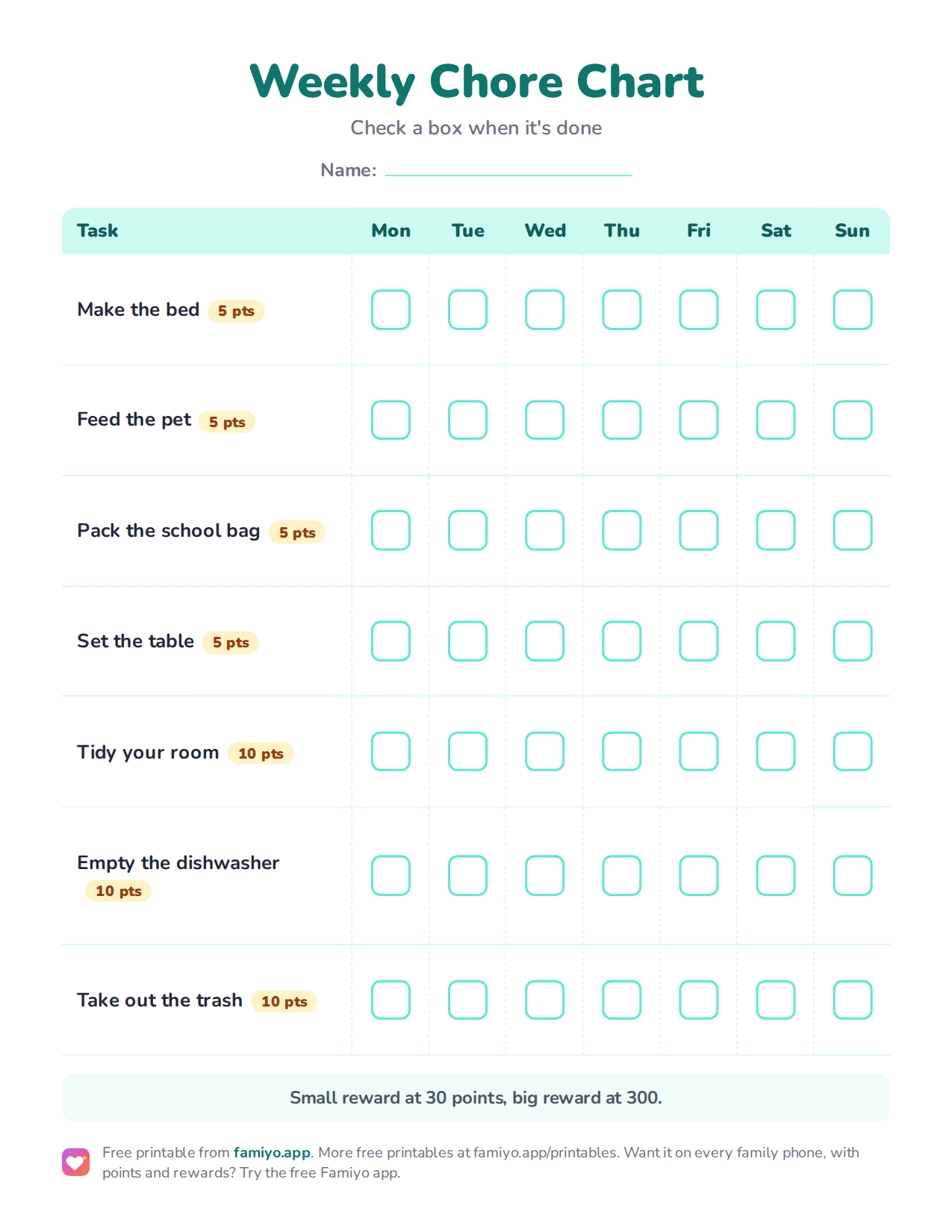
Free printable
Weekly Chore Chart
A weekly chart on one US Letter page. Download the PDF to print it, or save the image to use it on a tablet or in a document.
Free for home, classroom and nonprofit use, see the license. More free printables.
A chore chart in Word is a table with a little shading, and you can have one printed and on the fridge in about ten minutes. This page walks through the exact setup, shows three layouts worth copying, and includes a free printable weekly chart if you would rather skip the formatting.
How to build a chore chart in Word, step by step
You do not need a template for this. A table gives you everything a template would, and you can edit any cell later without breaking the layout.
- Open a blank document and switch the page to landscape (Layout tab, then Orientation). A chart needs width.
- Insert a table with 8 columns and one row per chore plus a header row. For three chores, that is 4 rows.
- Type the header: Chore, Mon, Tue, Wed, Thu, Fri, Sat, Sun. Make the first column about twice as wide as the others.
- Shade the header row a light color, set the font to 14 or 16 points for everything, and make each row tall enough for a child's handwriting (around 0.6 inches).
- Fill in the chores, one per row, and leave the day cells empty for ticks or stickers.
Then do two small things that make a big difference. Put the child's name as a large heading above the table. And set the table to repeat on a single page, so it never splits across two sheets.
Three layouts that work
The table above is the base. Here is how to bend it for different homes.
| Layout | Columns | Best for | Watch out for |
|---|---|---|---|
| Weekly grid | Chore plus Mon to Sun | Ages 5 to 12 who like ticking boxes | Weekends get skipped, so shade Sat and Sun |
| Morning and evening split | Two small tables, one per time of day | Kids who do chores before school and after dinner | Twice the printing, so keep rows few |
| One chart for the whole family | Chore, Who, Mon to Sun | Families with 2 or 3 kids | Fairness: balance minutes, not the number of rows |
For a child under 5, drop the day columns entirely. Use one row per chore with a picture and a single tick box, and reset it daily. Our ideas for a chore chart for a 3-year-old show what that looks like in practice.
What to put on the chart
The chart is only as good as the chores on it. Use the typical ranges from this table and pick from the row that matches your child.
| Age | Good first chores | Daily time |
|---|---|---|
| 4-5 | Make the bed (roughly), set and clear their own place, feed a pet | 10 to 15 minutes |
| 6-7 | Tidy their room, pack the school bag, sweep | 15 to 20 minutes |
| 8-9 | Load the dishwasher, fold laundry, take out the trash | 20 to 30 minutes |
| 10-12 | Clean the bathroom sink, cook a simple meal with an adult nearby | 30 minutes |
Start with 2 to 3 daily tasks for preschoolers and 3 to 4 for school-age kids. From age 8, add one bigger weekly job in its own row. Our guide to daily chores for kids by age has more options for each row.
The free printable chart
The printable below is a weekly chart with a chore column, seven day boxes and a point value beside each task. It suits a child of about 6 to 9, who can read the chore names and tick a box alone. Print it, write the child's name at the top and cross out any chore that does not apply. If you want your own wording, copy the chores into the Word table and keep the layout.
Where a Word chart stops working
Be honest about what a printed chart cannot do. It will not remind anyone. It cannot repeat itself, so every Sunday you reprint or wipe it clean. Adding points means counting ticks with a pen, and a child has to ask you before spending anything. If two kids share a chart, one of them will inevitably tick a box that nobody checked.
None of this is a reason to skip the chart. A fridge sheet is a good first month. But if you find that the paper is the weakest part of the system, you have two options: a spreadsheet, or an app. We cover the first in our article on a chore chart in Notion, which also explains where that setup runs out.
Running the chart in Famiyo
Famiyo is a free family app for iPhone and Android that combines a shared family calendar, chores with points and a rewards shop; kids join with a code, no email needed. For a chart, it replaces the table and the pen. You add each chore once, set it to repeat daily, weekly or every few days, and choose the points. Kids see their own tasks on their phone, tick them off or wait for you to approve, and you get a push notification when a chore is done. Every phone stays in sync.
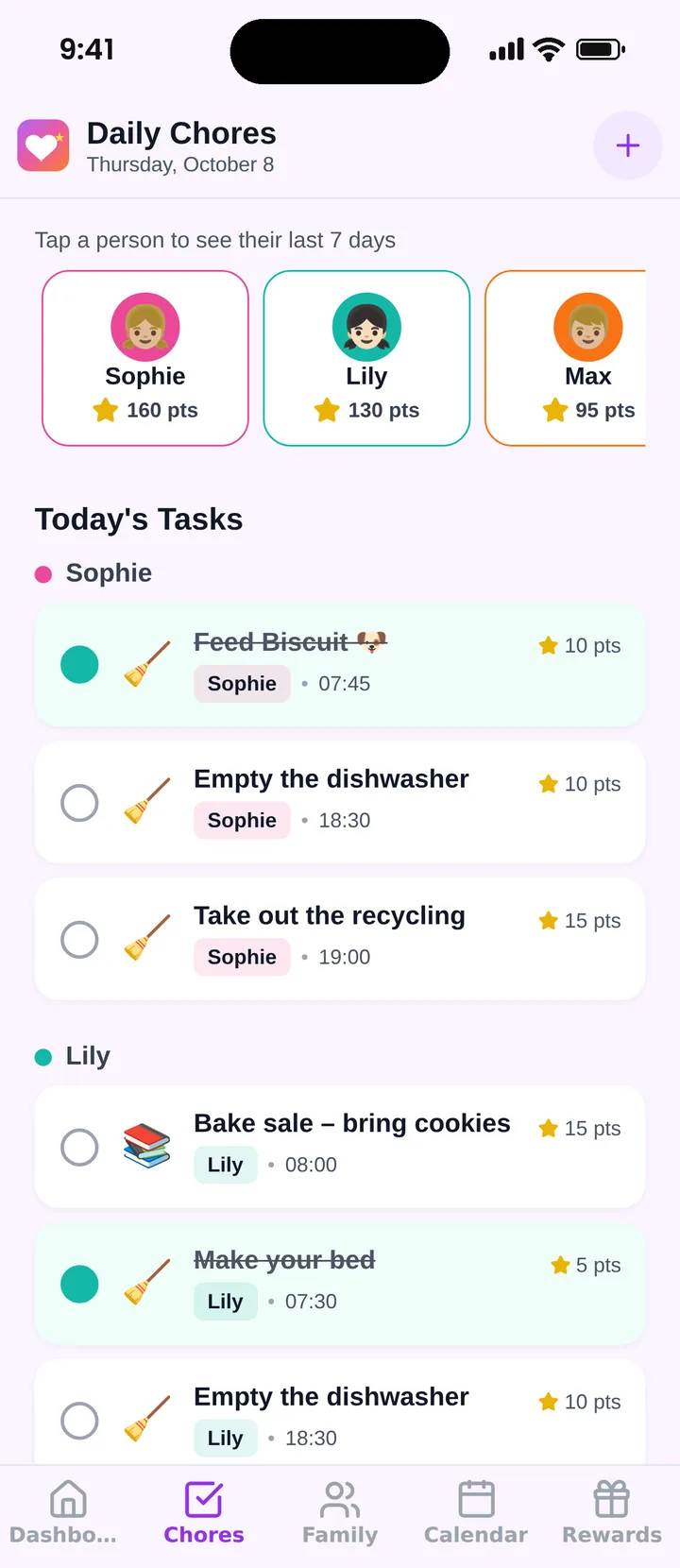
The free plan covers up to 3 family members and 1 repeating task. See our list of the best chore chart apps to compare the options.
Print the weekly chart tonight, stick it at kid height, and review it with your child on Sunday.
Frequently asked questions
Does Word have a built-in chore chart template?
Word offers calendar and planner templates when you search the template gallery, but a plain table works better for chores. Insert a table with a chore column and seven day columns, and you control every row, color and font.
How do I make check boxes in a Word chore chart?
On the Developer tab, choose the check box content control and place one in each day cell. If you plan to print the chart and use a pen, a simple empty square character works just as well and needs no setup.
Should I print the chart or keep it on a screen?
Print it if kids need to see it every day. A chart on the fridge gets seen at the moment chores happen. A file on a computer gets forgotten. Print a fresh copy each week so you can change chores without redrawing.
How many chores should one Word chart hold?
Three or four per child is plenty. Preschoolers do best with two or three. A chart with ten rows looks thorough on Sunday and gets ignored by Wednesday, so start small and add a row only when the first ones feel automatic.
Can I put points on a Word chore chart?
Yes. Add the point value in the chore name column, such as Make the bed (5), and total the week at the bottom. The catch is that you do the adding by hand, and kids can't spend the points anywhere unless you keep a separate list of rewards.
Try Famiyo With Your Family
Chores with points, a rewards shop for kids and one shared family calendar. Set it up in a couple of minutes.



Free to download • No credit card required • Available on iOS & Android