DIY Chore Chart for Kids: 5 Ways to Make One at Home
Make a DIY chore chart for kids in under an hour: five homemade designs with materials, steps and tips for keeping the chart in use past week three.
By Famiyo Editorial Team4 min read

A chore chart takes about 20 minutes to make and a few weeks to prove itself. The making part is the easy part. This page gives five homemade designs with what you need for each, one simple set of steps that works for any of them, and what to do when the chart starts to slip.
Pick the right DIY chart for your family
Choose based on the age of your kids and how much you want to redo each week. A pocket of cards is great for a 4-year-old who loves moving things. A dry-erase grid suits a 9-year-old who likes to see the whole week.
| Chart | What you need | Time to make | Best for |
|---|---|---|---|
| Dry-erase grid | Whiteboard or a picture frame with a sheet under the glass, a dry-erase marker, a ruler | 15 minutes | Ages 7 and up; easy weekly reset |
| Magnetic cookie sheet | Metal baking sheet, magnets, paper strips or printed icons, glue | 20 minutes | Ages 3 to 8; kids move magnets from "to do" to "done" |
| Pocket chart | Library pockets or envelopes, index cards, a poster board | 30 minutes | Ages 4 to 6; cards picked from a pocket |
| Clothespin chart | Clothespins, a cardboard strip or wooden board, a marker | 20 minutes | Ages 3 to 7; clip to the chores done |
| Poster board grid with stickers | Poster board, marker, ruler, stickers | 15 minutes | Ages 3 to 6; fast and cheap |
If you have more than one child, give each their own row or their own board in a different color. It makes it plain who does what and stops arguments about whose turn it is. Our guide to making a chore chart for 3 kids goes into the layout in more detail.
Make it in six steps
These steps work for any of the five designs.
- Choose 3 or 4 chores per child. Pick tasks they can really do for their age; see what to put on a chore chart for ideas by age.
- Draw the grid. Put the chores down the left side and the days Monday to Sunday across the top. Use a ruler and keep the boxes big enough for a thumb or a sticker.
- Add a picture next to each chore for kids who can't read yet. A quick sketch of a bed or a bowl is fine, or you can print small icons.
- Decide how a chore gets marked done. A magnet moved, a sticker, a checkmark, a clip. The marking should take a second and feel satisfying.
- Attach it at kid height. A chart you have to bend over or reach up to use will go unused.
- Set the reset day. Pick one fixed day, such as Sunday evening, to wipe the board, count up the week and start again.
Keep the first week simple. If a child completes everything on day one, that is the win. You can add a chore later; it's much harder to remove one without it feeling like a punishment.
Add a reward so the chart has a point
A chart on its own is a list. What keeps children coming back is something happening when they finish. For younger kids, a sticker and a few words is plenty. For school-age kids, a simple points scheme works well: 5 points for a small task, 10 for a medium one, 20 for a big job. Draw a "reward menu" on the side of the board with prices, such as 30 points for choosing dessert and 100 points for picking the family movie.
Your child should be able to afford a small reward every 2 to 3 days. Lower the prices if the first reward feels out of reach. The sticker chart guide covers how to keep that part going without turning it into bribery.
What to do when the chart stops working
Most paper charts fade in the third or fourth week. It isn't a sign that you did it wrong. It's the novelty wearing off.
The marking gets skipped. Move the chart closer to where the chores happen, and mark it together for a few days.
The chores are being done but the chart isn't updated. Decide whether the chart is for tracking or for reward. If it's for reward, only marked chores count. If it's for tracking only, drop the marking and just check the room.
The chart is full of old marks. Reset it every week, even if you have to do it yourself.
A sibling tears down the other's row. Move to separate boards.
Nobody remembers to look. That's the cost of paper, and the reason many parents move to something that sends reminders. Setting a small phone alarm for a family check-in at the same time each evening also helps.
When a digital chart makes sense
Famiyo is a free family app for iPhone and Android that combines a shared family calendar, chores with points and a rewards shop; kids join with a code, no email needed. It replaces the paper grid: you create a chore once, set it to repeat, pick which child does it and how many points it earns, and each child's phone shows today's tasks. Kids hear about new tasks by notification, and you hear when a chore is done. Every phone stays in sync, so there's nothing to redraw on Sunday.
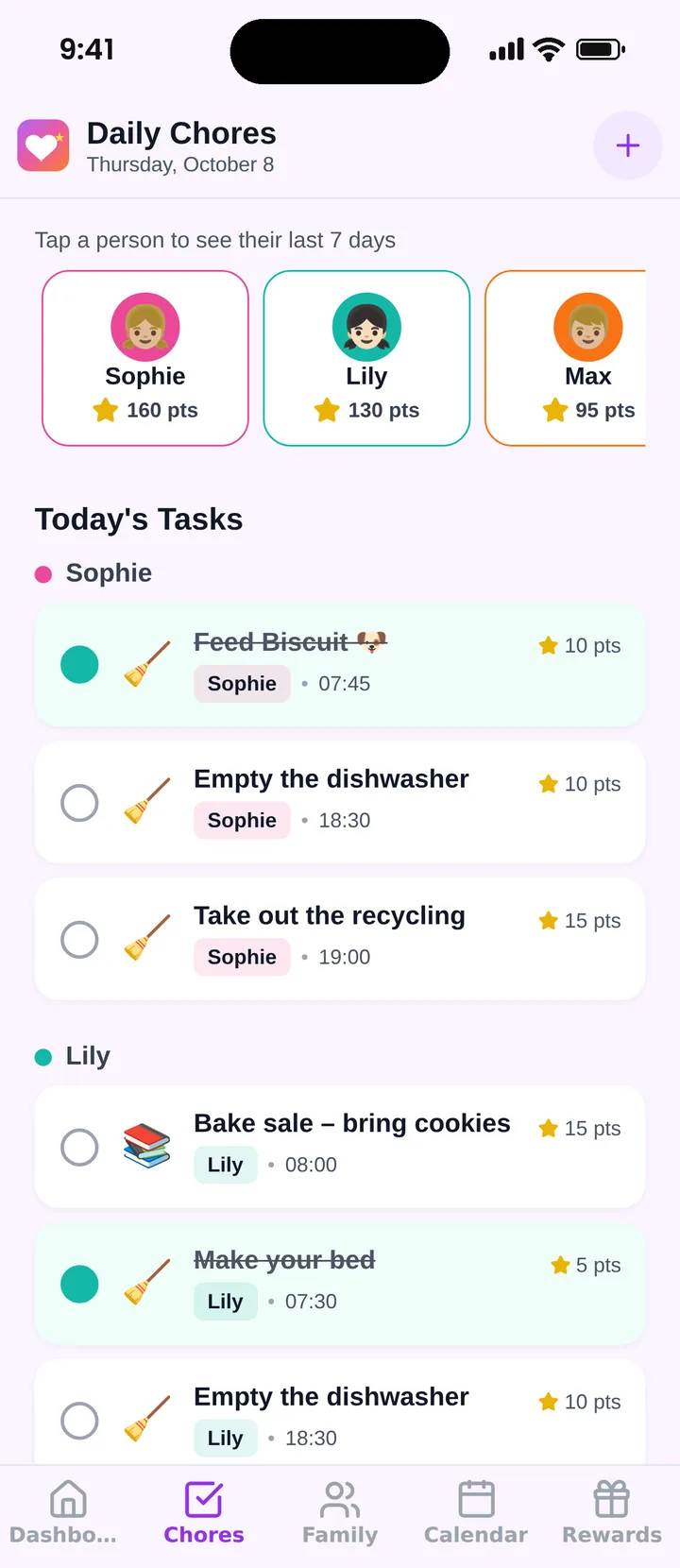
You can choose whether a parent approves each chore or kids check off their own. See our list of the best chore chart apps to compare options.
A simple next step
Pick one design from the table, gather the supplies tonight and make the chart tomorrow morning with your kids. Let them decorate it. If you want a ready-made layout to follow, see how to make a chore chart in 6 steps.
Frequently asked questions
What is the cheapest way to make a chore chart?
A sheet of paper or poster board with a hand-drawn grid, taped to the fridge, costs almost nothing. For something reusable, tape a grid onto a cookie sheet or a framed picture and use magnets or a dry-erase marker. Either takes about 15 to 20 minutes.
How many chores should go on a kids' chart?
Two or three daily tasks for preschoolers and three or four for school-age kids, plus one bigger weekly job from age 8. A chart with more than that gets ignored. You can always add a task once the first set runs on its own.
Where should I hang a chore chart?
Where the chores happen or where kids pass every day, at their eye level: the fridge, the kitchen wall, or the inside of a closet door in their room. Out of sight means out of mind, so avoid the back of a door or the garage.
Why do homemade chore charts stop working?
Usually because the setup takes too much upkeep, the chores are too many or too hard, or nothing happens when a child finishes. Keep the chart simple, reset it on the same day each week, and tie it to a small reward within a few days.
Try Famiyo With Your Family
Chores with points, a rewards shop for kids and one shared family calendar. Set it up in a couple of minutes.



Free to download • No credit card required • Available on iOS & Android