Shared Family Calendar App: Choosing One Everyone Will Use
How to choose a shared family calendar app: what it must do, questions to ask, red flags, free-plan traps and a first-week plan for the whole family.
By Famiyo Editorial Team5 min read
A shared calendar only works if the whole family opens it. That sounds obvious, yet most failed calendars fail for one reason: the person who picked the app loved it and three other people never installed it. This guide is about choosing for the least enthusiastic user in your house. It covers what the app must do, the questions that expose a weak fit, the red flags, the free-plan traps and a week-one plan.
What a shared family calendar app must do
Think about who will be in it. Two parents, maybe two or three kids, possibly a grandparent who handles Wednesday pickup or a step-parent in a second home. Every one of them needs to see the plan and, in most cases, change it.
The list below is the practical minimum.
| Need | Why it matters |
|---|---|
| Everyone has their own login or join method | Shared screens lead to shared mistakes |
| A color for each person | The fastest way to spot who is where |
| Repeating events | Practices and lessons should be entered once |
| Reminders to specific people | A school drop-off alert should not reach the whole family |
| Live sync | The change at noon has to reach the other parent by 12:01 |
| Role control | You decide who can add, edit or only view |
| Week and month views | Planning needs both zoom levels |
If an app fails any of the first three, the rest does not matter. People will drift back to texts.
Choose for the least willing person
The best test for any shared calendar is the person who will use it least. Ask these questions about each member.
- The 7-year-old: can they join without an email and read their own events in their own color?
- The teenager: is the app quick enough that opening it is easier than asking you? Teens abandon anything slow.
- The partner: can they add and edit, or do they have to ask you?
- The grandparent: is the screen readable, with large text and few taps?
- The second household: can the other home join without a full account on your side?
When one of these answers is no, it is a real problem, not a detail. A calendar with 80 percent of the family on it is worse than a paper one, because you still check both.
Questions to ask in the first trial
- How does a child join? Email, phone number or a short code?
- Can two parents both be administrators?
- Can I decide whether kids may create events, or only see them?
- If I change an event, how fast does everyone else see it, and do they get told?
- What do I lose on the free plan, and when do I hit it?
- Are there ads anywhere, especially in a child's view?
- How do I remove a person or a whole household later?
Question two is worth repeating. When only one adult owns the calendar, that person becomes the family secretary. The weight of remembering and entering everything sits on them, which is the mental load in app form. Read how this plays out in the mental load of motherhood, then pick an app where both parents have equal rights.
Red flags
- Setup requires every child to create an account with an email address.
- Only the owner can edit, so everyone else has to ask.
- Notifications are all or nothing.
- The member cap on the free plan sits below your household size.
- Updates need a manual refresh, so people see old information.
- The design is dense, so a 9-year-old gives up in the first minute.
- You cannot tell who an event belongs to without tapping it.
One more caution: be wary of an app that nudges you to import every other tool you use before you have decided it works. Start small, prove it, then add.
Handling the family members who resist
Resistance usually has one of three causes: another account to create, another thing to remember, or a feeling that the calendar is one person's project. Each has a fix.
For account fatigue, pick an app with the lightest possible join step. For the memory problem, tie the calendar to something people already do, such as checking it when they sit down to breakfast. For the ownership problem, hand over a section. Let your partner own the sports schedule, let the oldest child own their own activities, and let the grandparent own the pickup days. People defend what they built. A calendar that belongs to everyone is far easier to keep alive than one that belongs to you.
Free-plan traps in shared calendars
Sharing is the feature most often limited, which is awkward because it is the whole point. The usual traps:
- A cap on members that excludes a grandparent or second household.
- A cap on repeating events, which breaks the weekly rhythm of a family.
- Reminders reserved for paid tiers.
- A free tier that exists only for a short trial.
Count your real needs. Make a list of everyone who must see the calendar and the number of events that repeat each week. Hold that list next to the plan details. If you fit, free works. For a longer look at what free plans usually include, see our free family calendar app guide.
Your first week
- Day 1: Parents choose the app together, then agree on colors. Keep them the same in every place you use.
- Day 2: Add fixed commitments with repeating events: school, work, practice.
- Day 3: Bring in the kids. Sit with each child for two minutes and show them how to find today.
- Day 4: Add the other household or the grandparent, and show them the one thing they need, such as the pickup days.
- Day 5: Make one decision visible in the calendar that used to be a text, like a weekend plan.
- Day 7: Hold a 10-minute check-in. Ask each person what they could not find.
Add a rule on day one: nothing exists until it is on the calendar. If a coach texts a change, it goes in before anyone replies. This single habit does more than any feature. For more routines that keep a calendar current, see family time management habits.
Using Famiyo as the shared calendar
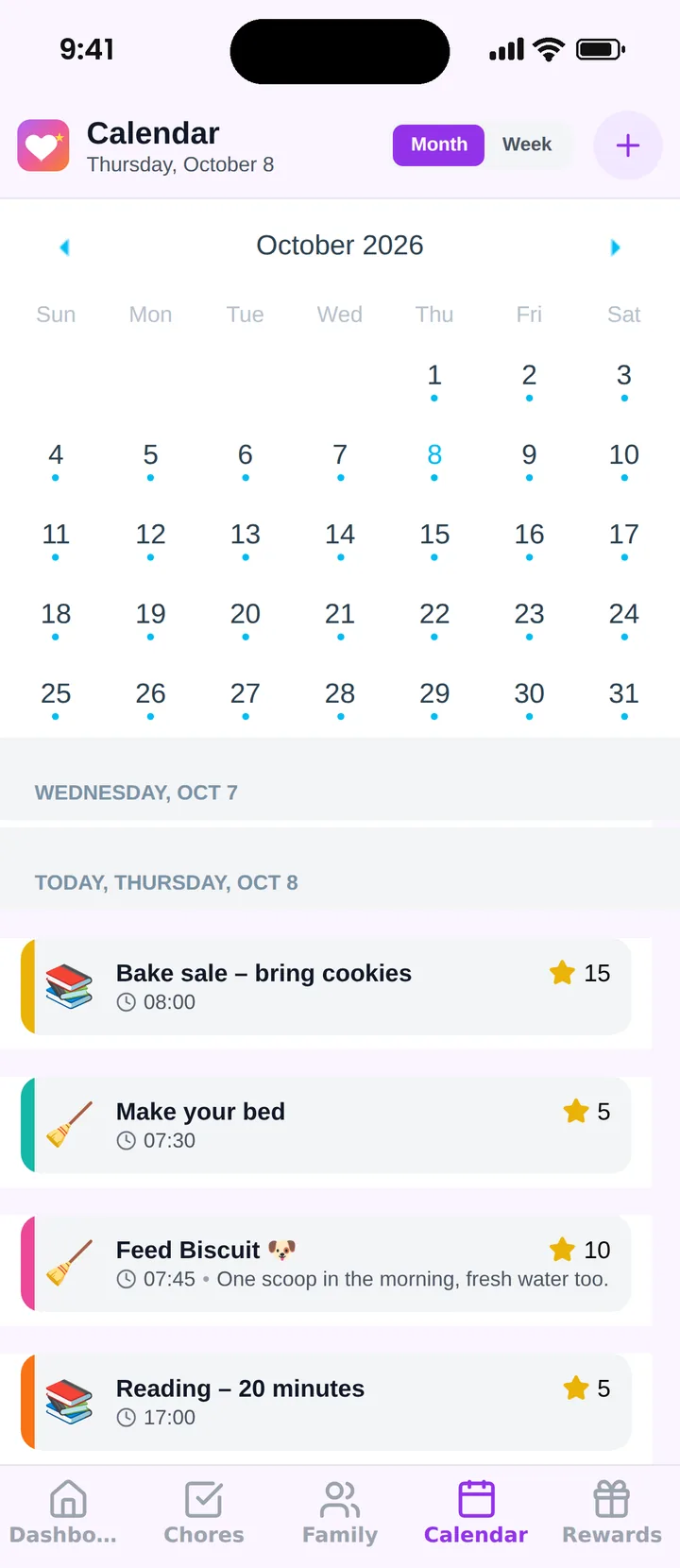
Famiyo is a free family app for iPhone and Android that combines a shared family calendar, chores with points and a rewards shop; kids join with a code, no email needed. For shared calendars, children join on their own phone with a 6-character code, every family member gets a color, and both parents can be administrators. You decide whether kids can create events or check off their own tasks. Changes sync live between phones and push notifications go to the people involved. The free plan allows up to 3 family members and 1 repeating task. See our list of the best shared family calendar apps.
One test that settles it
After a week, ask the youngest person who is using it and the oldest person who is using it to tell you what is on Thursday. If both can answer without asking you, you have picked the right app.
Frequently asked questions
What makes a shared family calendar app different from a regular calendar?
A family app is built for several people editing one schedule: colors per person, kids as members, reminders aimed at the right person and live sync. A regular calendar can be shared, but sharing often takes setup and an account for everyone.
Can kids use a shared family calendar?
Yes. From around age 6 many kids can read their own colored events. Pick an app where children join without their own email, and where you decide whether they can add events or only view them.
How do I get my partner to use the shared calendar?
Make it the only place that answers schedule questions, and let them add things too. People use what they help build. Give them admin rights, not just viewing rights, and avoid keeping a parallel paper version.
What if some family members will not download another app?
Ask what the real objection is. Often it is another account or password. An app that lets people join with a short code lowers that barrier. For one stubborn adult, add their events yourself and show them the benefit first.
How many people can share a family calendar?
It depends on the app and plan. Free plans often cap members, so count everyone who needs access, including a second household or a grandparent who does pickups, before choosing.
Try Famiyo With Your Family
Chores with points, a rewards shop for kids and one shared family calendar. Set it up in a couple of minutes.



Free to download • No credit card required • Available on iOS & Android